
Learn how to manually reschedule an existing calendar appointment in Kartra.
If a contact needs to move their appointment, you can update the booking from your calendar agenda.
Reschedule an appointment
Step 1: Find the appointment
- Go to Events > Calendars.
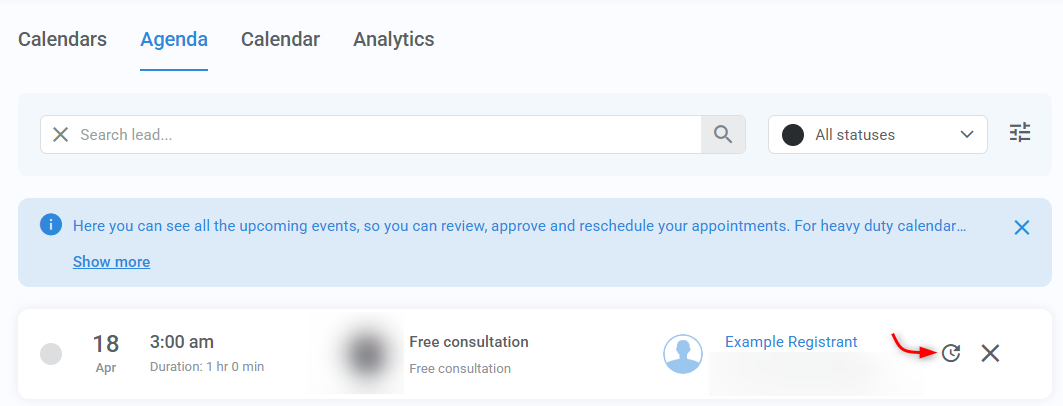
- Open the Agenda tab.
- Search for the appointment using the contact’s name or email address.
Pro tip
Use filters like status, calendar, class, coach, or date range to narrow down your results.
Step 2: Reschedule the appointment
- Once you find the appointment, click Reschedule.
- Select a new date and time.
- Click Reschedule to confirm.
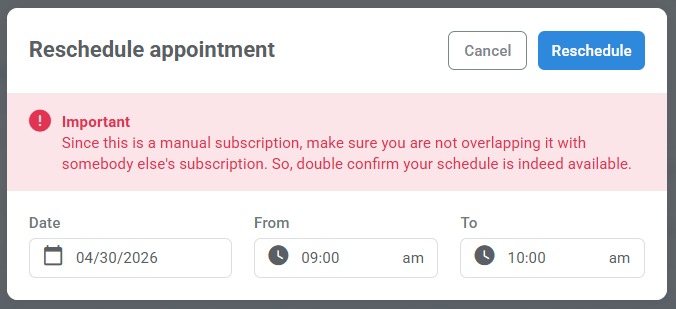
Important:
Because this is a manual change, make sure the new time does not conflict with another appointment. It is best to confirm availability carefully before saving the reschedule.